The app
Everything in one calm window.
Live speed, time left and every part of every file. Light or dark, Arabic or English. Press Space on a finished file to look inside it.
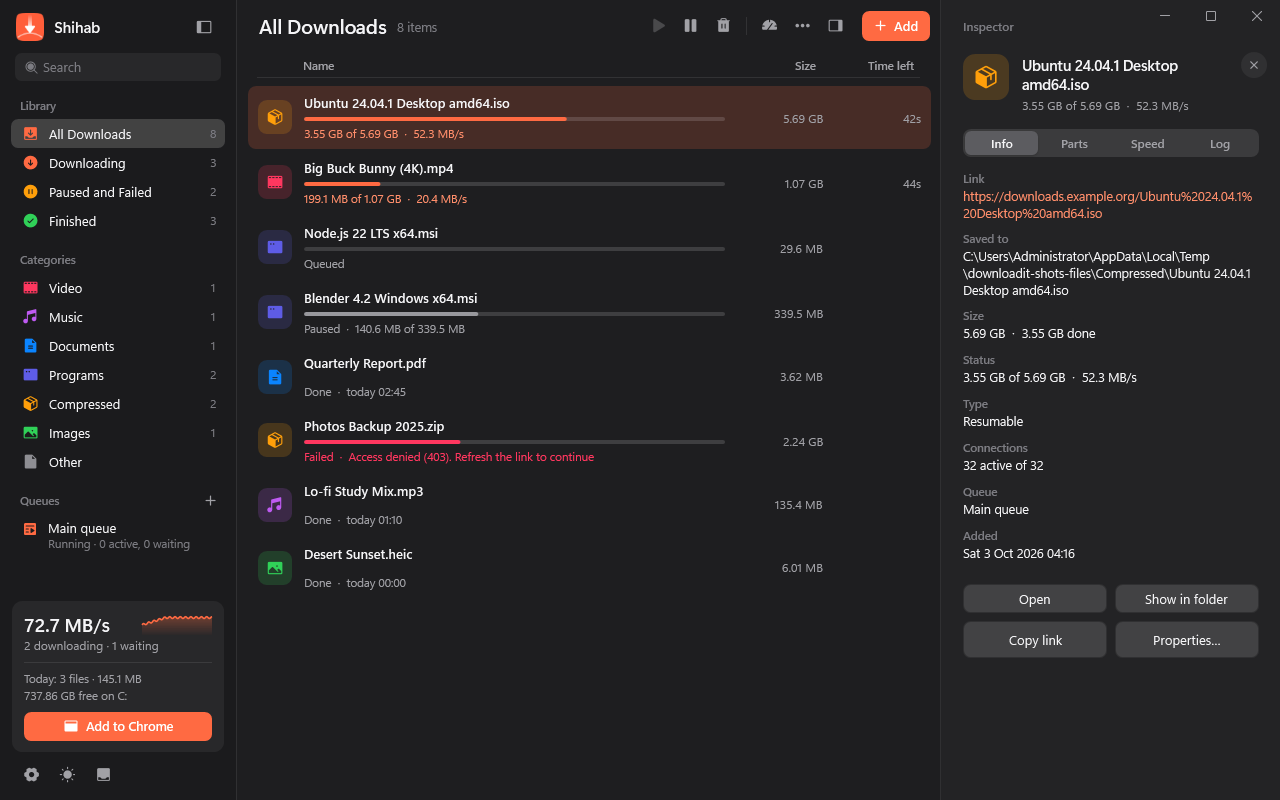
Shihab splits every file into as many as 64 parts, finds the fastest way for each server on its own, and carries on after anything: a crash, a restart, an expired link.
Live speed, time left and every part of every file. Light or dark, Arabic or English. Press Space on a finished file to look inside it.
The same file, once through the browser and once through Shihab, on an ordinary home connection in Riyadh, several runs each.
Starts at 8, keeps adding while the speed climbs, and stops the moment the server says enough. Up to 64.
Power cut, crash, expired link: every finished part is kept, and Shihab asks for a fresh link only when it needs one.
Click download in Chrome, Edge or Brave and it lands in Shihab with your sign-in, so protected links keep working.
The video playing on a page, in the quality you pick, from 480p to 4K, with the sound joined in.
Press Space on any finished file for a big, instant preview of the video, picture or document.
The whole app in Arabic with the Cairo typeface, right to left or left to right, your call.
| Shihab | IDM | |
|---|---|---|
| Connections per file | 64 | 32 |
| Finds the best number by itself | Yes | No |
| Light and dark design | Yes | No |
| Arabic, right to left | Yes | No |
| Preview with Space | Yes | No |
| Updates itself | Yes | Asks you |
| Price | Free | Paid licence |
One file. It installs itself for you, no admin rights, and keeps itself up to date.
Download Shihab.exe and open it.
If Windows says it protected your PC, click More info, then Run anyway. It shows for every new app until enough people have installed it.
Click Install. Shihab is in your Start menu and on your desktop.
Open Shihab and press Add to Chrome in the sidebar: it walks you through it in under a minute, for Chrome, Edge and Brave. The Chrome Web Store listing is in review.
Yes. No ads, no account, no trial that runs out.
Windows shows that note for any new app it has not seen many times yet. Shihab is made by Gamers Academy in Riyadh and only ever talks to the sites you download from and to this page for updates.
Shihab checks this site every few hours. A new version downloads quietly, is checked against its fingerprint, and installs when you restart. Unfinished downloads carry on afterwards.
That is the idea: browser capture, video grabbing, queues, speed limits, scheduling, resume after anything, and more connections per file than IDM allows.
Windows Settings, Apps, Installed apps, Shihab, Uninstall. Your downloaded files stay where they are.